Dome Lighter
Using PolyHaven HDRI and local lighting texture assets just in one click.
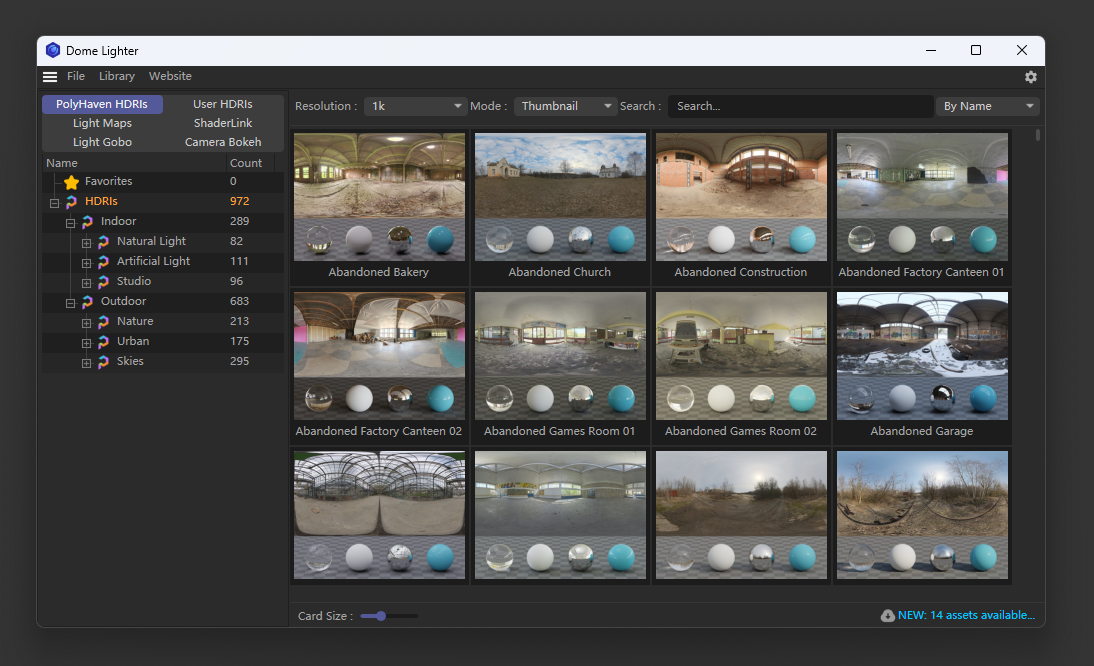
Dome Lighter is a Cinema 4D asset browser and apply tool for HDRIs and local texture libraries.
It automatically targets the matching Dome/Sky light for the active renderer.
Or drag and drop your texture.
Please set Boghma asset path first in Boghma Preference.
Top Menus
File > Check for updates: opens the downloader to download or verify PolyHaven assets.File > Open Asset Folder: opens the asset folder for the current tab.Library > Create Library Category: creates a category folder under the current local tab.Website > PolyHaven / Boghma / Documentation: opens the related web page.
Left Tabs And Category Tree
Tabs: switch between
PolyHaven HDRIs,User HDRIs,Light Maps,ShaderLink,Light Gobo,Camera Bokeh, and other enabled libraries.Category tree: click a category to refresh the asset cards.
Double-click a category: expand or collapse it.
Right-click a category: local tabs support
Open Current DirectoryandRegenerate Previews.
Filter Bar
Resolution: PolyHaven HDRI download resolution,1k,2k,4k,8k, or16k.Mode: PolyHaven display mode.Thumbnailuses compact thumbnails;Previewuses wide previews.Search: filters the current asset list.Search Mode: search behavior,By NameorBy Type.Settings button: opens the settings window.
Update badge: appears when new PolyHaven assets are available and opens the downloader.
Asset Area
Scroll to browse asset cards.
Card Size: changes card size, range64-256, step32, default128.
Asset Cards
Click: selects the card.
Double-click: PolyHaven HDRIs download at the selected resolution and then apply; local assets apply directly.
Alt+ click: quick apply. PolyHaven HDRIs download first; local assets apply directly.Drag and drop: drag a card as file-path data to fields or objects that accept paths.
-
Right-click menu:
Add to Favorites: adds the asset to Favorites.Remove from Favorites: removes the asset from Favorites.Open Assets Folder: opens the asset folder.Show in Picture Viewer: available for PolyHaven assets and opens the preview image.Search for the same tag: searches by the selected asset tag.Set Assets: applies the current asset.
Settings Window
Global Settings
Auto Update: checks for PolyHaven updates on startup.SSL Verify: enables SSL verification for network requests.Use Absolute Path: writes absolute paths when applying assets; when off, the plugin tries to use file names only.
Tabs Management
Show: controls whether the tab is visible in the main window.Tab: the tab display name in the management tree.
Tab Details
Key: internal tab identifier. Keep it stable after creation.Title: tab display name.Path: tab root folder.Ratio: asset card aspect ratio.Original Folders: original asset folder names, separated by commas.Preview Folders: preview folder names, separated by commas.Original Exts: original asset file extensions, separated by commas.Preview Exts: preview image extensions, separated by commas.Original Regex: regular expression for matching original folders.Preview Regex: regular expression for matching preview folders.
Buttons
Add Tab: creates a tab.Delete Tab: deletes the selected tab. The PolyHaven tab cannot be deleted.Save: saves settings.Revert: restores the last saved settings.Close: closes the settings window.
Local Library Structure
A local tab scans category folders under its root folder. Each category usually contains one original asset folder and one preview folder:
Root
  Category A
    Textures
    Thumb
  Category B
    Textures
    Preview
Original assets and previews are paired by matching file stem. File extensions can differ.
Downloader
Download and Verify All: downloads and verifies all PolyHaven assets.Download New Assets: downloads only newly available assets.Stop Download: stops the current download.
Changelog
- 1.0.4 - Restored legacy Gobo, light mapping, bokeh and dome processing, whilst supporting drag-and-drop. - Optimised the generation of local resource previews, reducing preview file sizes and the time taken for scaling and writing to disk. - When both JPG and PNG previews with the same name exist, JPG is used by default; compatibility with existing preview formats such as PNG, JPG and WEBP is retained. - Local preview matching now supports the `_thumb`, `_preview` and `_thumbnail` suffixes in filenames, and is compatible with separators such as underscores, hyphens, full stops or spaces.
- 1.0.3 - Fixed an issue where a download task remained paused when restarted after being paused - Fixed an issue where saving the settings window would overwrite bookmarks across tabs - Fixed an issue where local resource bookmarks could not be removed, and added compatibility with older bookmarks saved by category name - Restored the PolyHaven search mode, with support for filtering by resource name or tag - Fixed an issue where the programme would still check for updates upon launch even after ‘Automatic Updates’ had been disabled - Fixed an issue where scan settings for custom tabs were not taking effect - Fixed a UI display bug when adding new tabs in the settings window - Added a ‘Default Texture Colour Space’ option to the settings
- 1.0.2 - Restored the independent double-click application logic for each lighting texture preset - Fixed an issue where the scaling algorithm was incorrectly applied when generating previews for small images - Fixed an issue where the ‘Create New Thumbnail’ function was not working - The interaction for texture application methods can now be configured - Increased the height of the tab tree in the Settings window to prevent it from being collapsed - Fixed an issue where a download task remained paused when restarted after being paused - Fixed an issue where saving the Settings window would overwrite the favourites in each tab - Fixed an issue where local resource favourites could not be removed, and added compatibility with older versions that saved favourites by category name - Restored the PolyHaven search mode, supporting filtering by resource name or tag - Fixed an issue where the programme would still check for updates upon launch even after ‘Automatic Updates’ had been disabled
- 1.0.1 - Fix known issues
- 1.0.0 - Release