Repel Effector
An Effector that attracts and repels elements.
This Effector is a cross-over of the Swirl Modifier and the Push Apart Effector.
The main differences between the two are listed below:
Cons
The Repel Effector is slower than the Swirl Modifier.
Many of the capabilities of the Swirl Modifier aren’t implemented on this Effector, this was by design.
Pros:
The Repel Effector can be used on both geometries and clones.
It uses Vector Fields in order to compute the direction in which elements will be displaced.
It can use the real geometry of the clones to create a cascading effect of repulsion using collision detection.
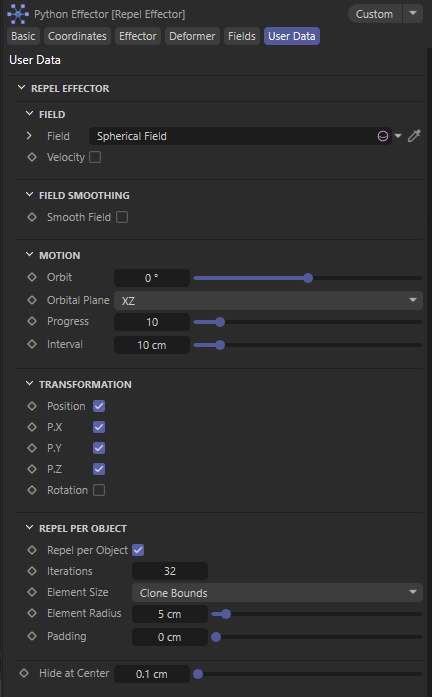
Field - This is where the Vector Field needs to be linked in order for the Effector to manipulate the displacement of elements in space.
Velocity - If enabled the magnitude of the vectors will also be considered for a variable displacement. By default the Effector normalizes all vectors for a uniform displacement.
Smooth Field - If enabled treats the Field like an image blurring it’s pixels. In this context an area of neighboring vectors will be averaged to eliminate extreme deviating directions.
Smoothing Radius - Defines the area of averaged vectors.
Angle Threshold - Defines a deviation in direction that will be averaged if detected.
Orbit - Defines an inclination of the vectors around the center of the linked Field. It is used to create a swirling convergence or disperse.
Orbital Plane - Defines the plane in which the Orbit is taking place.
Progress - Defines the number of iterated steps taken place when displacing elements.
Interval - The magnitude of a displacement step.
Position X,Y,Z - This is similar to other Effectors. Limits the displacement of elements on specific Axis.
Rotation - Enables the rotation of clones. These only apply on clones and not geometry elements.
Vector Orientation - Defines a transition between the original clone’s rotational state and that defined by the Vectors of the linked Field.
Orbit Orientation - Defines a transition between the original clone’s rotational state and that defined by the Orbit.
Up Axis - Defines the local perpendicular axis to the one that will be used to align each clone.
Orientation Axis - Defines the local axis of each clone that should be aligned with the Fields vector direction.
Repel per Object - Will create a cascading effect of clones pushing neighboring clones. If disabled clones will intersect.
Iterations - Increase this if you see clones intersecting.
Element Size - Defines the way each clone is validated for collisions.
Clone Bounds - Uses a sphere centred on the box. Its radius is the box’s largest half-size. It’s the fastest mode and ignores rotation completely. Round or roughly cube-shaped clones work well with it. Long or flat clones get a lot of empty space around their short sides, because a 200 × 20 × 20 cm clone becomes a 100 cm radius ball.
Box Collision - Uses the Bounding Box of clones to compute collisions.
True Geometry - Uses the actual geometry of each clone. The slowest method.
Custom - Defines a constant sphere around each clone. It's radius is defined by Element Radius.
Element Radius - is only used in Custom mode, where every element is a sphere of that radius. The one other place it applies is as a fallback: when there’s no clone geometry to measure, every mode falls back to Element Radius spheres. That happens with a Matrix object, which has no child objects, and with points in Deformer mode. With a Cloner in Clone Bounds, Box Collision or True Geometry mode, it’s ignored, because each clone’s size comes from its own geometry.
Padding - Defines the gap left between neighboring elements’ surfaces once they’ve been pushed apart. At 0 they end up just touching. At 5 cm there’s a 5 cm gap between every pair, measured surface to surface on whichever shape the Element Size mode builds. Internally each shape is inflated by half the Padding, so two neighbors together add up to the full gap.
Hide at Center - Defines a radius on the center of the linked Field where in case the elements converge they will be hidden automatically.
Changelog
- 1.0.0 Release Version