Quick Renamer
Batch rename objects, materials, takes, and layers with token-based naming.
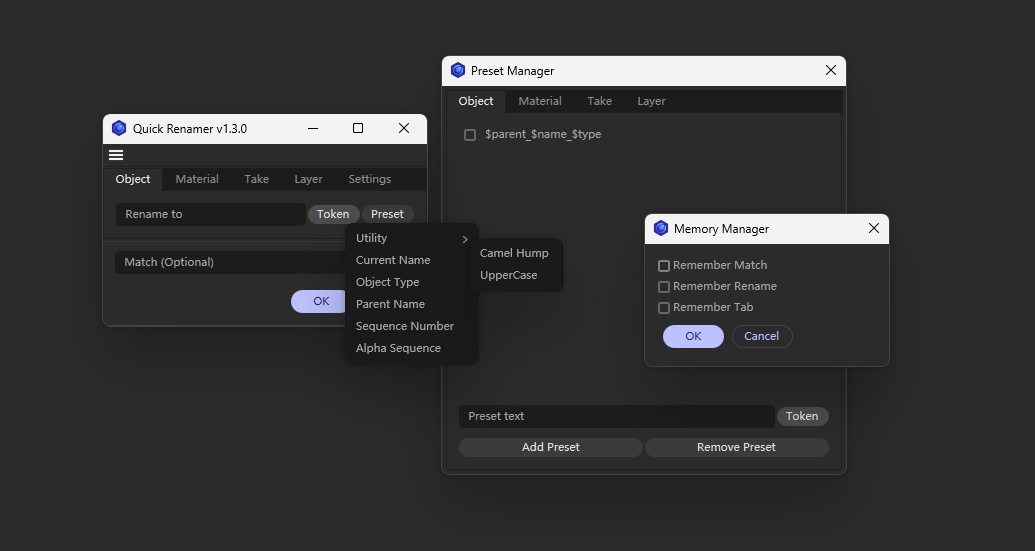
Batch rename objects, materials, takes, and layers in Cinema 4D without editing names one by one.
Quick Renamer gives everyday naming cleanup a small focused window. Choose the target type, enter a naming template, insert tokens for current names, object types, parents, cameras, numbers, or alphabetic sequences, and generate consistent names in one pass.
Features
Batch rename objects, materials, takes, and layers
Supports
$##numeric sequences and$ABCalphabetic sequencesToken menus for current name, object type, parent name, material owner object, material type, take camera, and related context
Optional
Matchfield for replacing only a specific part of existing namesObject renaming follows Object Manager hierarchy order
Separate preset lists for objects, materials, takes, and layers
Memory Managercan remember the last match text, rename templates, and active tab
Usage
Select the objects, materials, takes, or layers you want to rename, then run Quick Renamer.
Enter a Rename to template in the matching tab. Use the token menu to insert variables, or choose a saved format from the preset menu. Leave Match empty to generate full replacement names; fill Match to replace only that text inside the existing names.
Use Preset Manager in Settings to manage reusable naming formats for each target type. Use Memory Manager to decide whether the dialog should remember previous input.
Version
v1.2.0 - 2026-05-24
Object sequences now follow Object Manager order
Take sequences no longer reset per parent
Official plugin resource structure, config-file presets, and memory settings
Object, material, take, and layer rename targets
Notes
Renaming only affects the currently selected target type. For material owner tokens, the plugin uses the first object it finds using that material.
Changelog
- 1.4.1 - Optimized interaction between rename preview and main dialog - Main dialog changed to a persistent window - Added real-time preview of the first selected rename result - Replaced OK/Cancel buttons with Apply/Close
- 1.2.0 2026/05/24 - v1.2.0 Fixed an issue that caused incorrect sorting when using serial number variables to name objects and sessions.