Interval Selection
Interval Selection is a point, edge, and polygon Ring/Loop selection tool.
Interval Selection v0.3.1 Help
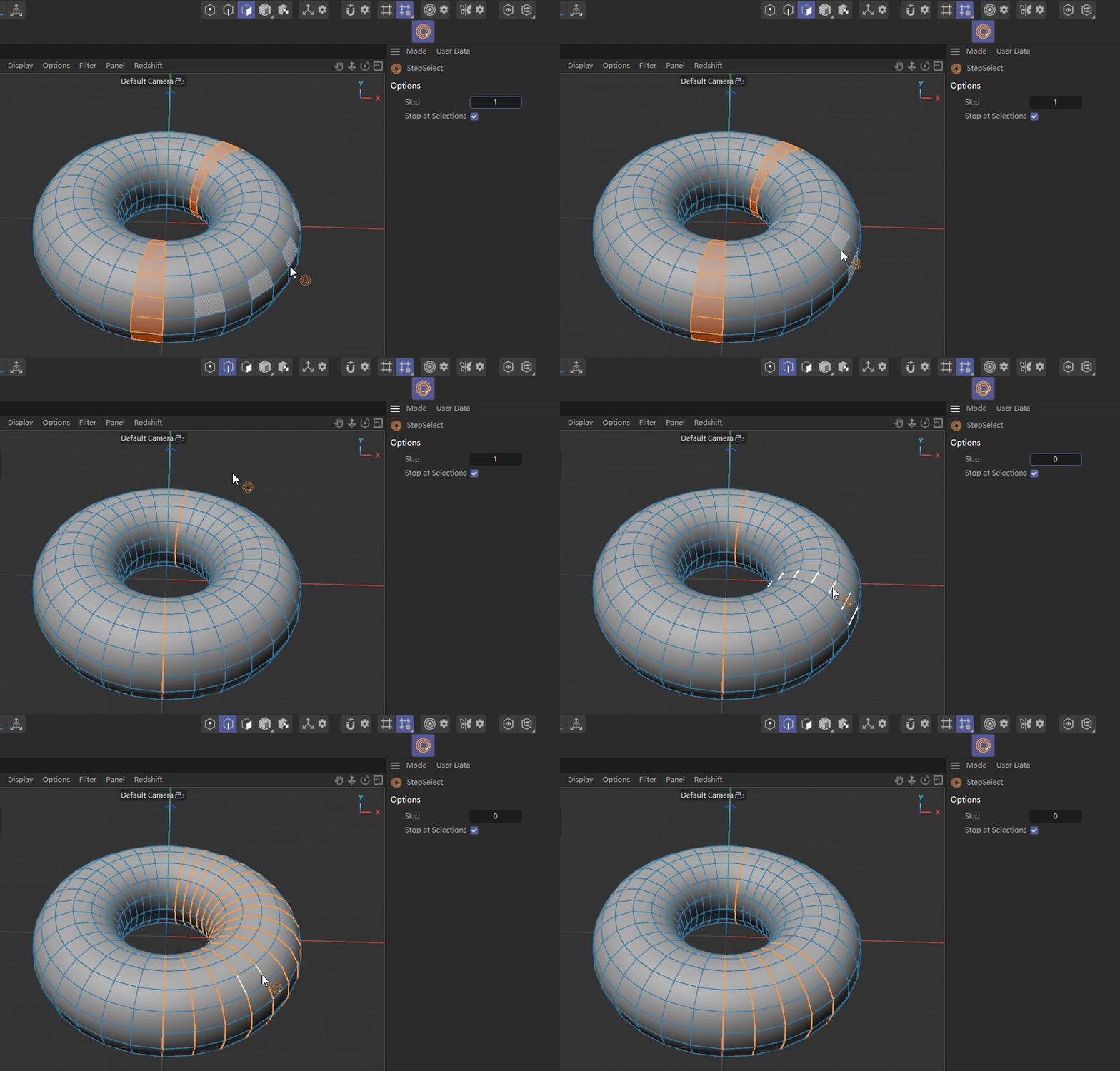
Interval Selection is a Ring/Loop interval selection tool for Cinema 4D. It works on editable polygon objects and selects points, edges, or polygons in the direction indicated by the cursor, with optional step-based skipping.
Features
Single click: selects a Ring in the cursor direction in Point, Edge, or Polygon mode.
Double click: expands the previous single-click Ring selection into Loops.
Hover preview: previews the points, edges, or polygons that will be selected before clicking.
Bidirectional selection: automatically selects both Ring directions when the cursor is close to the edge center line.
Interval selection: uses
Skipto select at a fixed step interval, while always keeping the starting component selected.Selection boundary: when
Stop at Selectionsis enabled, traversal stops at existing selections.
Parameters
Parameter |
Description |
|---|---|
|
Interval value. |
|
Stops Ring/Loop traversal at existing selections, useful when an existing selection should act as a boundary. |
|
Available only in Edge mode. When enabled, single click selects in the Loop direction with |
Mouse Controls
Action |
Result |
|---|---|
Click a component |
Selects the Ring in the current direction; in Edge mode with |
Double-click a component |
Expands the previous single-click selection into the perpendicular Loop/Ring direction. |
Click empty space |
Clears the current component selection when no modifier key is held. |
Modifiers
Action |
Selection Mode |
|---|---|
No modifier |
Replace the current selection. |
|
Add to the current selection. |
|
Remove from the current selection. |
Supported Modes
Point mode: outputs a point selection.
Edge mode: outputs an edge selection and supports
Loop Mode.Polygon mode: outputs a polygon selection.
Suggested Workflow
Switch to Point, Edge, or Polygon mode, then select an editable polygon object.
Set
Skipas needed. For example,Skip = 1selects every other component, andSkip = 2selects one out of every three components.Hover over the target component and check the preview direction.
Click to create the Ring selection; double-click the same direction when you need to expand it.
To limit the traversal with existing selections, create the boundary selection first, then enable
Stop at Selections.
Changelog
- 0.3.1 2026/07/05 - Release