HDR Blur
HDR Blur is an HDR environment texture blur plugin designed for Redshift Dome Light.
Main Features
Select a Dome Light to generate a Gaussian-blurred EXR texture inside the current project and automatically apply it to the Dome Light.
The original HDR/EXR source file will never be overwritten.
How to Use
Save the Cinema 4D project first.
Parameter changes cannot be applied if the project has not been saved.Create or select a Redshift Dome Light, then add an
.hdror.exrenvironment texture.-
Select the Dome Light, then run:
Extensions > HDR Texture Blur
The plugin will automatically add or select the corresponding tag.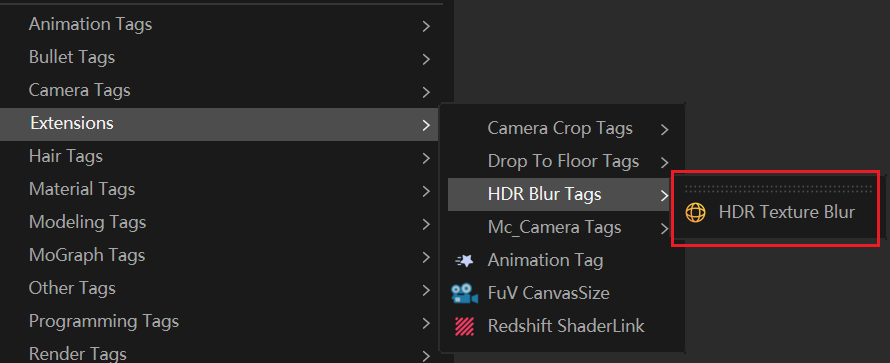
-
Configure the settings in the Attribute Manager:
Blur Range:
0.001°–30°
Higher values create a softer blur effect. Starting from1°is recommended.Output Resolution:
512–4096
Lower resolutions generate faster results.-
Performance Usage:
Low (1 thread, recommended)
Standard (2 threads)
Click Regenerate and Apply Automatically.
Once completed, the Dome Light will automatically use the generated texture.
Optional Operations
Enable Real-Time Adjustment:
After stopping changes to the blur value for approximately 0.6 seconds, the plugin will automatically generate the result. Continuous adjustments will only keep the final operation.Click Cancel Generation to stop pending or currently running tasks.
Click Restore Original Texture to make the Dome Light use the originally recorded texture path again.
Click Sync Dome Texture Now to reload the current Dome Light texture path.
Output Files & Cache
Output Directory:
Project Directory\tex\HDRBlur\Naming Format:
SourceFileName_HDRBlur_BlurStrengthdeg.exrExample:
Usingstudio.hdrwith a5°blur will generate:studio_HDRBlur_5deg.exrEach source HDR file keeps only the latest blur-strength cache.
Cache files generated from other HDR sources will not be deleted.If generation fails or is cancelled, the previous valid result will remain available.
Notes
The project must be saved before use, otherwise the plugin cannot determine the
texoutput directory.The current version only supports the traditional Redshift Dome Light.
It does not support Redshift material nodes or batch processing of multiple lights.Cinema 4D can continue to be used during generation, but avoid moving or deleting source textures or closing the project.
For the first generation, it is recommended to use 1 thread and a lower output resolution to verify the result before increasing quality.
Common Issues
-
Generation Failed:
Confirm that:The project has been saved.
The Dome Light has a valid
.hdr/.exrtexture path.Check the current status displayed at the top of the plugin tag panel.
Changelog
- 1.0.1 - Changed the min/max range and step precision for blur intensity - Added slider controls - Updated the icon again