FractalShader
A specialized shader for 2D fractals. Works only with Standard/Physical Renderer.
Warning: This plugin makes extensive use of various Python Libraries that you need to manually download and place on your C4D's Python311 folder.
FractalShader is an augmented port of the FractaShades Python library.
FractalShader is a Standard Renderer shader.
The FractalShades library (https://gbillotey.github.io/Fractalshades-doc/index.html) Fractalshades is a Python package for creating static and interactive visualizations of 2d fractals. It targets Windows, Unix and Mac operating systems and implements efficient algorithms for very-deep exploration of the Mandelbrot and the Burning Ship sets (1.e-2000 scale and beyond). Rendering speed is optimized thanks to state-of-the-art algorithm (based on perturbation technique and chained bilinear approximations). Implementation-wise, the core-loops run in parallel on the CPU and they use just-in-time compiling through Numba. Arbitrary precision calculations rely on a dedicated MPFR C-extension compiled with Cython (Windows, Mac & Linux OS).
The augmentations added specifically for this plugin include:
A dedicated interactive Explorer Window with 7 additional fractal formula presets:
Julia Set
Julia Set power N
Tricorn (Mandelbar)
Multicorn Power N
Phoenix
Lambda (Logistic Map)
Newton (z^N-1)
A Custom Formula supporting most mathematical notations and trigonometric functions (There's a legend at the last attribute group) Animatable parameters Custom Color Schemes An extra coloring algorithm for fractals of converging points (Magnet-type) Render in JPEG (FractalShades saves in PNG format) A caching system for baking an arbitrary number of frames for fast playback A blurring post effect
A Custom color palette
Attributes:
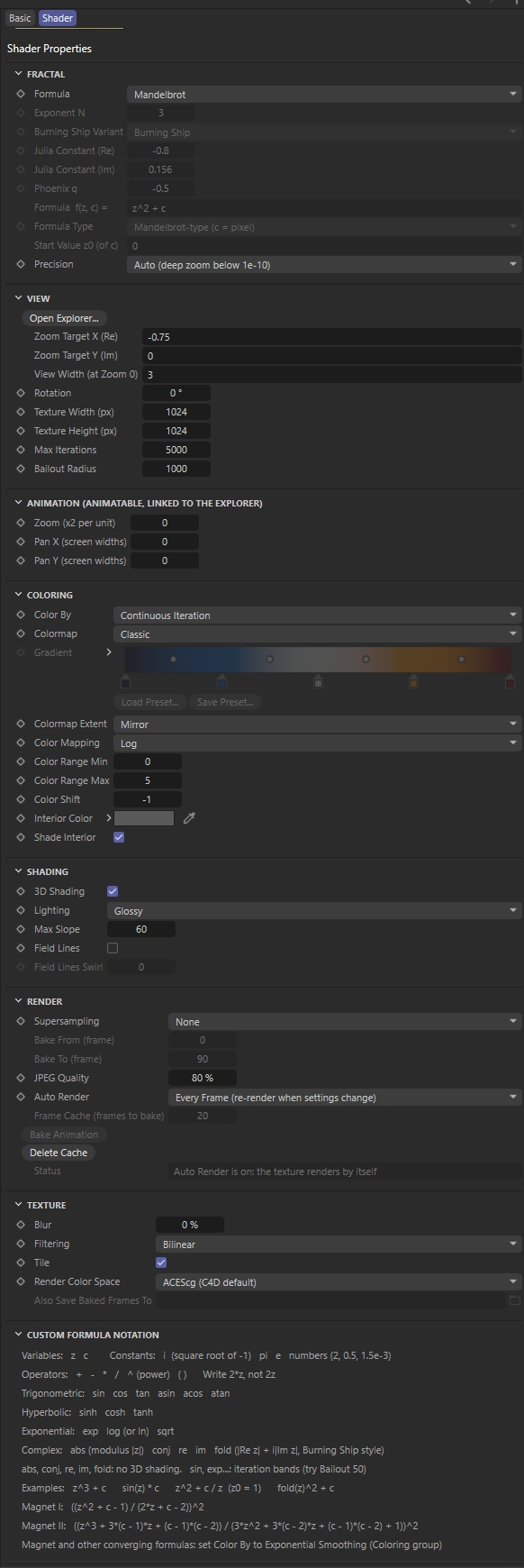
Fractal: Formula - A list of 13 fractal formulas. The first 3, Power Tower and Collatz are part of the FractalShade library and are evaluated automatically with their custom deep zoom algorithms.
Exponent N - Concerns only the Mandelbrot Power N fractal formula. Defines the power of the z^N+c.
Burning Ship Variant - A list of 5 variants of the Burning ship fractal formula.
Julia Constant (Re)- Defines the Real constant of the Julia set. Available only if the fractal formula is Julia.
Julia Constant (Im) - Defines the Imaginary constant of the Julia set. Available only if the fractal formula is Julia.
Phoenix q - Defines the q factor of the Phoenix fractal formula.
Formula f(z,c) = - A custom fractal formula, by default the Mandelbrot set. Custom formulas don't support deep zoom.
Formula Type - Evaluation mode of the custom formula.
Start Value z0 (of c) - Defines the starting point of z0. Precision - A list of precision modes
Auto (deep zoom below 1e-10)- By default, will alternate between Standard and Deep Zoom depending the formula supported by FractalShades.
Standard (double) - The common precision algorithm for most fractal formulas.
Deep Zoom (arbitrary) - The optimized precision algorithm for the first 3 fractal formulas.
View: Open Explorer... - Opens the interactive fractal Explorer window. Zoom Target X (Re) - The current X zoom coordinate. Due to the precision limitations of C4D these values are returned as strings. This is also the reason they are not animatable. Zoom Target Y (Im) - The current Y zoom coordinate View Width (at Zoom 0)- The current zoom factor Rotation - The current view angle. Texture Width (px)- The width of the render. Texture Height (px) - The height of the render. Max Iterations - The depth of the algorithmic execution. Bailout Radius - A threshold used in the calculation of escape-time fractals. It determines when an iterated point is considered to be escaping toward infinity. Unskew (stretched areas) - For the Burning ship and other non-holomorphic fractals, some areas are very skewed and it is desirable to apply an “unskewing matrice” (a linear 2x2 transformation that keep the areas constant but changes the angles). These 4 coefficients (skew_00, skew_01, skew_10, skew_11) are read-only in the UI.
Explorer: This is a navigational tool that automatically updates the corresponding attributes on the main window.
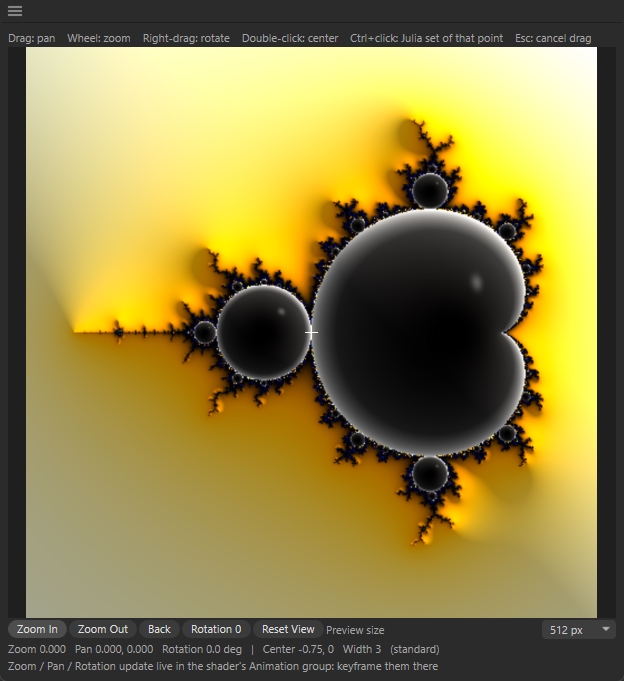
Click and drag will pan the view.
Mouse Wheel zooms in/out.
Right-click and drag rotates the view.
Double clicking on a point will center the view.
Crl+clicking changes the Formula o Julia defied from that point on the Mandelbrot map.
Animation: These attributes are linked to the Explorer and are automatically updated. You can set keyframes to those.
Colors: Color by - Each pixel gets a number, that number is transformed, and the result picks a colour from the colormap. It chooses the number each pixel gets.
Continuous Iteration - Counts how many iterations the point took to escape, smoothed so you get gradients instead of hard bands. This is the classic look.
Distance Estimation - Calculates how far the point is from the edge of the set. Colors hug the boundary, and thin filaments stay visible.
Exponential Smoothing - For Magnet-type formulas, where points converge instead of escaping (Custom Formula only). Colormap - 12 color preset schemes Gradient - Available for editing if the Colormap is Custom Colormap Extent - The behavior of the texture if the surface on which it is projected exceeds the rendered UV coordinates.
Mirror - Mirrors the image
Repeat - Repeats the image
Clip - Clips the image
Color Mapping - Reshapes the number of each pixel before it’s culturedLog - compresses big values. Iteration counts range from 1 to thousands, so without it the colors near the set would change much faster than those far away. This is usually the best choice.
Linear - the number is used as is. Color bands get denser and denser as you approach the set.
Square Root - Between Log and Linear.
Color Range Min/Max - decide which part of that reshaped number spans the colormap. The value at Min gets the first colour of the gradient and the value at Max gets the last. A narrow range packs the whole colormap into a small span, giving many color bands that repeat quickly. A wide range spreads it out, giving slow, smooth gradients.
Color Shift - Will shift the color scheme
Colormap Extent - decides what happens outside the range
Interior Color - Defines the color on areas that are part of the equation.
Shade Interior - Adds a shading to the interior.
Exceptions
Power Tower colors by the length of the cycle each point settles into.
Collatz colors by the plain iteration count.
Color By is greyed out for both, but Mapping and Range work the same way.
Newton colors by which root a point reaches, and the Color Range only controls how dark the edges between roots get.
Shading: 3D Shading - A list of shading effects. Lighting - Different lighting effects
Glossy
Rough
Pure Diffuse
RGB Lights Max Slope - Sets how deep the 3D relief from 3D Shading looks. Surface Normals - Surface Normals choose how the 3D Shading works out which way each point of the fractal is facing.
Potential (default) - uses the fractal’s potential: a smooth value that rises as you get closer to the set, the same quantity behind the smooth color gradients. The relief follows the color bands, so the set looks like it sits in a smooth, rounded landscape that climbs towards its edge. It works for every formula that has 3D shading.
Milnor - Uses the distance to the set’s edge, with a formula from the mathematician John Milnor. That needs an extra quantity during the calculation (the second derivative), and Fractalshades only provides it for the standard Mandelbrot. That’s why the option is greyed out for other formulas. The relief follows the shape of the boundary itself, so bulbs and filaments get their own rounded, tube-like shading instead of following the color bands.
Field Lines - Draws lines that run across the color bands, pointing in towards the set, a bit like iron filings around a magnet. Mathematically they follow the set’s “external rays”. They lighten and darken the colours rather than replacing them.
Field Lines Swirl - twists those lines.
Field Lines Orbit Points - Each extra point adds a finer layer of lines on top of the previous ones. Orbit Points sets how many of those points are averaged
Field Lines Damping - Sets how much the later orbit points count compared with the first: the weight of the last point divided by the weight of the first.
Render: Supersampling - Antialiasing methods Bake From (frame) - Defines the start frame from which the frames will be calculated and baked. Bake To (frame) - Defines the last frame to bake JPEG Quality - Defines the JPEG compression Auto Render -
Every Frame - This will render the fractal at every change
Off - This will bake the fractal Bake Animation - Will start rendering frames from the Bake window Delete Cache - Empties baked frames from memory
Texture: Blur - An extra effect after rendering. Useful if the render needs to be used as a Sub-polygon displacement. Also Save Baked Frames to - Will save baked frames to a directory. These files will not be deleted when clearing cache.
The following libraries need to be downloaded in order for this plugin to run: The following wheels (whl files) concern Windows. If you use Mac you need to download the corresponding Mac versions.
GMPY2 2.3.2 https://pypi.org/project/gmpy2/#files -> gmpy2-2.3.2-cp311-cp311-win_amd64.whl
llvmlite 0.44.0 https://pypi.org/project/llvmlite/#files -> llvmlite-0.50.0-cp311-cp311-win_amd64.whl
mpmath 1.4.1 https://pypi.org/project/mpmath/#files -> mpmath-1.4.1-py3-none-any.whl
pillow 13.0.0 https://pypi.org/project/pillow/#files -> pillow-13.0.0-cp311-cp311-win32.whl
Pygments 2.21.0 https://pypi.org/project/Pygments/#files -> pygments-2.21.0-py3-none-any.whl
fractalshades 1.2.1 https://pypi.org/project/fractalshades/#files -> fractalshades-1.2.1-cp311-cp311-win_amd64.whl
Numba https://pypi.org/project/numba/#files -> numba-0.68.1-cp311-cp311-win_amd64.whl
Changelog
- 1.0.1 clash between numpy 2 and the Fractalshades library prevented Explorer from rendering
- 1.0.0 Release Version