
Object Collection
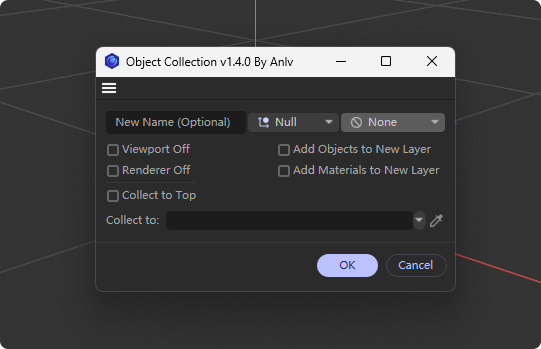
Functional Overview
Object Collection is a Cinema 4D plugin designed to quickly collect selected objects into a group. Once the collection is complete, you can activate the plugin to rename the group. It helps users efficiently organize objects within a scene.
Plugin Features
- Object Grouping: Collects selected objects into a new group (empty objects).
- Group Renaming: Activates the plugin after collection to rename the created group.
- Layer Management: Automatically creates a corresponding layer for the new group and links the group and its child objects to that layer.
- Non-destructive Operations: Supports undo operations, ensuring safe editing.
How to Use
Collecting Objects
1. Select the objects you want to collect in the scene.
2. Click the plugin button. The selected objects will be collected into a group named "Object Collection".
3. You can repeat the collection steps. Once collection is complete, activate the plugin to open the group and rename it.
Rename Group
1. When the collection is complete, the currently active object will be located within the group. Activate the plugin to open the rename dialog. If another model was accidentally selected, you can hold Ctrl and click the plugin button to activate the rename. (You can also click the collection group, then activate the plugin to open the rename dialog.)
2. Enter the new group name in the dialog.
3. Upon confirmation, the group name will be updated and a corresponding new layer will be created.
Notes
- The plugin automatically hides group icons to reduce visual clutter.